Automation for your business

Leave everyday tasks to automation and free up more time to run your business.

Automated actionsMarketing automation
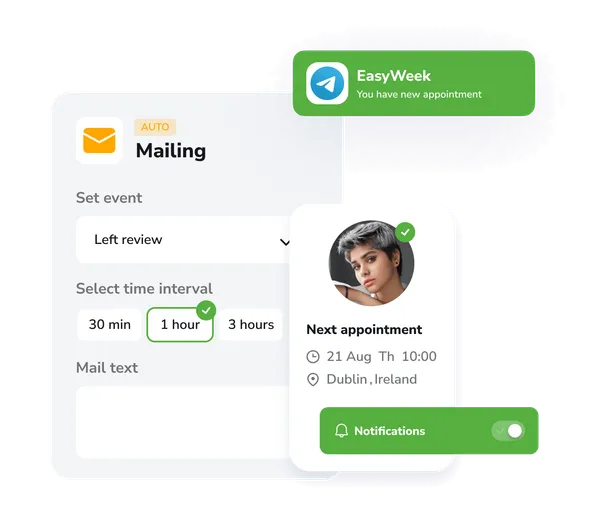
Model: event → action

Set up automated actions that run after specific events in the system. For example, sending a message after a new booking is created.

Recurring events

Create automatic recurring events and bookings on a set schedule, without manual entry.

Custom triggers

Define the conditions under which the system will automatically perform certain actions: sending reminders, updating statuses, awarding loyalty points.

14 days of the full version — free

Use all product features completely free and without limits. Explore the functionality, benefits, and ease of use of EasyWeek.
Start getting the most out of every customer #2

Ready-made solutions for your business

Choose your industry to get a tailored option for your sector.

Beauty Beauty

Healthcare Healthcare

Sport Sport

Services Services

Leisure Leisure

Education Education

Pets Pets

Rental Rental

Car Car

Hospitality Hospitality

Other Other

A handy app for all devices

Our system works on smartphones, tablets, and in the web version. No additional equipment needed.


EasyWeek client app logo
For Booking Find, book and get reminded — all in one app.
Customer app
Girl with phone
EasyWeek client app screenshot
EasyWeek business app logo
For Managing Appointments, team, clients and your own website — all in one app.
Business app
Girl with tablet
EasyWeek business app calendar view screenshot

Our pricing

  • No card required
  • 14-day free full-version trial
  • No hidden charges
Free forever
€0
Essential features
User avatars Pro
from €8.33
per month
Compare all plans

Join the companies that trust us

Create your success story with EasyWeek!

Frequently asked questions

Can’t find the answer? Get in touch with our friendly team.

Workflow automation is setting up automated actions in response to specific events in the system. For example, automatically sending messages, updating statuses, or creating recurring bookings.

Many events can be automated: sending customer reminders, creating recurring bookings, updating statuses, awarding loyalty points, sending reports, and much more.

No, our interface is very simple and easy to understand. You can set up most automations without technical knowledge by simply choosing an event and an action from a drop-down list.

Yes, you can easily create recurring events on any schedule: daily, weekly, or monthly. The system will automatically create all the required bookings.

There’s no limit to the number of automations. You can create as many rules and triggers as you like to streamline your business.

Stay with your customers — we’ll handle the rest

Try EasyWeek for efficient business management. Our support team is always here for you: 7 days a week, free on any plan.
Focus on your service — we’ll take care of everything else
AI Pricing

Support chat

Real people, not bots. Our team replies within minutes.

WhatsApp Telegram

Questions? Message us!

We’re online nowSupport manager photoSupport manager photoSupport manager photoSupport manager photo
How it works